ECH (Encrypted Client Hello) - A Tale of Troubleshooting and DNS
Imagine that you have a tighly controlled environment where egress is closed except for specific domains that you whitelist.
A user complains that he is unable to install extensions for Cursor.
You look at the Cursor doc https://cursor.com/docs/enterprise/network-configuration:
marketplace.cursorapi.com,cursor-cdn.com,downloads.cursor.com,anysphere-binaries.s3.us-east-1.amazonaws.com: Used for client updates and downloading extensions from the extension marketplace.
But all of those domains are already whitelisted.
You switch gears and think of making a proxy via Artifactory: https://docs.jfrog.com/artifactory/docs/ai-editor-extension-repositories.
Alas, that requires an Enterprise license which you do not have.
You try setting up a generic Artifactory repository and tinkering with the settings in the Cursor IDE. It won’t work, because that “AI editor extension” is an adapter with an API, which the generic repo does not offer.
Ok, there’s no workaround that unblocks the user and that is sutainable. You have to troubleshoot and figure out why the extensions installation is not working even though all the necessary domains are whitelisted.
You hop into one of the machines in the controlled environment and reproduce the issue. You look in the Cursor logs and it says that fetching from https://marketplace.cursorapi.com/... fails.
You copy the URL and try it in he Firefox browser. It fails.
You do a curl https://marketplace.cursorapi.com/... and it works.
That’s weird.
Wait a minute. Cursor is built on top of VSCode. VSCode uses Electron. Electron uses Chromium as its core rendering engine.
So it works in curl, but fails in Firefox and Chromium. From your years in the trenches, you know that this sounds like the lead to solve the case.
You try disabling HTTP/3 in Firefox: about:config > network.http.http3.enable = false > restart Firefox. But unfortunately this solves nothing. You undo the change.
You try disabling ECH in Firefox as per https://firefox-admin-docs.mozilla.org/reference/policies/disableencryptedclienthello/: about:config > network.dns.echconfig.enabled = false, network.dns.http3_echconfig.enabled = false > restart Firefox. And that url works in Firefox!
Via a curl -V, you verify if ECH is in the Features of your curl version, and you see that it is not there:
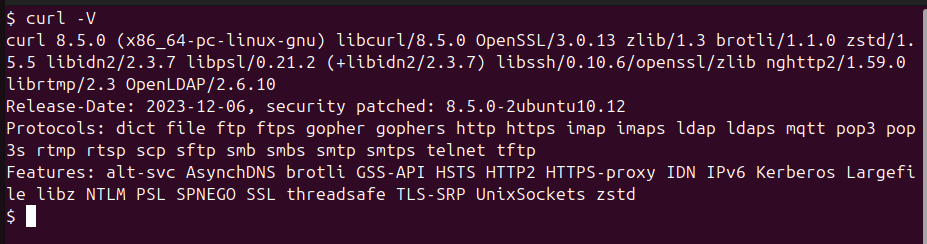
Btw, if you want to make an ECH enabled curl, use https://sven.stormbind.net/blog/posts/misc_ech_enabled_curl_oci_image/.
So it looks to be ECH.
It’s probably the same cause in Cursor. But you want to verify if the Chromium version used by Firefox does support ECH or not: Cursor > command palette > toggle developer tools > navigator.userAgent > the Chromium version is above 117. So it does support ECH.
You look in the egress control platform’s traffic logs and you see:
...
marketplace.cursorapi.com=MATCHED
...
hostname=cloudflare-ech.com state=NO_MATCH drop_reason=NOT_WHITELISTED
...
You now know that the marketplace TCP request is allowed, but then Cursor attempts CDN traffic with ECH and that’s the part that fails.
What is ECH
Encrypted Client Hello (ECH) is a privacy-enhancing extension to the TLS (Transport Layer Security) protocol that encrypts the very first message a browser sends when establishing a secure connection (the “ClientHello”) so that intermediaries (ISPs, Wi‑Fi operators, firewalls, etc.) can no longer see which specific website you’re visiting.
A little bit of History
ECH is the successor to an earlier proposal called Encrypted SNI (ESNI). It hides the Server Name Indication (SNI) and other sensitive handshake metadata inside an encrypted layer of the TLS handshake.
- In standard TLS, your browser sends a ClientHello in plaintext, including:
- The TLS version and cipher suites it supports
- The SNI, i.e., the hostname you’re connecting to (e.g., example.com)
- With ECH, this ClientHello is split into:
- An outer (unencrypted) part with non-sensitive parameters and a generic “outer SNI”
- An inner (encrypted) part that contains the real SNI and other sensitive data, encrypted with a public key published by the server.
Only the server (or its edge, like Cloudflare) that holds the matching private key can decrypt the inner ClientHello and learn the actual hostname.
ECH was created to close the last major plaintext metadata leak in modern HTTPS connections.
Even with HTTPS and encrypted DNS, traditional TLS leaks the SNI in plaintext.
DNS encryption (DoH/DoT) protects the name-to-IP lookup, but not the SNI in the TLS handshake. ECH was created to encrypt that remaining piece.
How ECH Works
- Client discovers ECH config via DNS
- The browser looks up a special DNS record (the HTTPS resource record, sometimes called SVCB/HTTPS RR) for the site.
- This record includes the server’s ECH public key and configuration.
- Client builds an encrypted ClientHello
- Using that public key, the browser encrypts the real SNI and other sensitive fields into the inner ClientHello.
- It then constructs an outer ClientHello with:
- A generic, shared hostname (e.g.,
cloudflare-ech.comon Cloudflare’s network) - Non-sensitive TLS parameters
- A generic, shared hostname (e.g.,
- The encrypted inner part is attached as an extension.
- Handshake proceeds with the outer SNI visible, inner SNI hidden
- On the wire, observers see:
- A TLS handshake to a generic name (e.g., cloudflare-ech.com)
- Encrypted payload that only the server can open.
- The server decrypts the inner ClientHello, learns the real hostname, and continues the TLS handshake as normal.
- On the wire, observers see:
ECH is designed to work with DNS over HTTPS (DoH) or other encrypted DNS transports.
If DNS queries are unencrypted, an observer could still learn the hostname from DNS even if ECH hides it in TLS.
ECH is an issue in a controlled network
Obviously ECH is useful if you are in somebody else’s network and you want privacy.
But in this story, you are the custodian of a controlled network where ECH is causing an issue.
From https://developers.cloudflare.com/ssl/edge-certificates/ech/:
Some enterprise or regional networks may need to audit or apply filtering policies to traffic that traverses their network. These policies are expressed in terms of domain names, not IP addresses. Consequently, they are best applied at the local DNS resolver in response to the A and AAAA queries for the individual domain names.
However, for settings wherein DNS-based filtering is not applicable, there are two ways in which networks can disable ECH to allow existing filtering mechanisms to continue working as expected.
The most reliable way is via the local or recursive DNS resolver itself, by dropping ECH configurations from HTTPS resource records returned to clients, or, preferably, by returning a “no error no answer” or NXDOMAIN response to HTTPS queries. This prevents clients from obtaining the necessary information to use ECH. Note that modifying HTTPS resource records may cause failures for clients that perform DNSSEC validation, so dropping HTTPS responses may be the preferred approach. This will prevent browsers, such as Chrome from using ECH.
The second way to disable ECH is via a network canary domain. In particular, your network’s DNS resolver can return a “no error no answer” or an NXDOMAIN response to queries made to the use-application-dns.net canary domain ↗. This will prevent browsers, such as Firefox from using ECH. For more information, see Firefox’s frequently asked questions page ↗ for Encrypted Client Hello.
So what you basically have to do is make the DNS server return NODATA (query successful, but no response available for the query) when a client queries for HTTPS (Type 65) records, so that the client gracefully falls back to standard A (Type 1) and AAAA (Type 28) queries.
If you manage DNS via a Windows DNS Server, you can create a policy with PowerShell.
If you are using AWS Route 53, you can use the DNS Firewall:
- AWS Console > DNS Firewall > Domain Lists > Create one with the domain
cursor-cdn.com - AWS Console > DNS Firewall > Rule Groups > create one:
- choose the domain list you created in the first step.
- action =
BLOCK - query type =
TYPE65 - response for BLOCK action =
NODATA
- Associate the VPC to the rule you created in step 2.
Now if you go to the machine where Cursor was unable to install extensions, and query for the HTTPS records, you won’t see an ANSWER SECTION when you run dig HTTPS cursor-cdn.com.
Here’s the same thing but with a Python script:
import socket
from dnslib import DNSRecord, QTYPE, RCODE

PORT = 5354
UPSTREAM_DNS = "1.1.1.1"
UPSTREAM_PORT = 53

# Set up local socket
udps = socket.socket(socket.AF_INET, socket.SOCK_DGRAM)
udps.bind(("127.0.0.1", PORT))

print(f"Mock DNS Server listening on 127.0.0.1:{PORT}...")
print("Forcing NODATA for TYPE65 (HTTPS) | Forwarding other records to 1.1.1.1")

while True:
    try:
        data, addr = udps.recvfrom(4096)
        request = DNSRecord.parse(data)
        qtype = request.q.qtype
        qname = request.q.qname

        if qtype == 65: # HTTPS Record
            print(f"[HTTPS] {qname} -> Forcing NODATA (NOERROR, empty answer)")
            reply = request.reply()
            reply.header.rcode = RCODE.NOERROR
            response_bytes = reply.pack()
        else: # Forward everything else (A, AAAA, MX, etc.) to Upstream
            print(f"[FORWARD] {qname} (Type: {QTYPE[qtype]}) -> Querying 1.1.1.1")
            upstream_sock = socket.socket(socket.AF_INET, socket.SOCK_DGRAM)
            upstream_sock.settimeout(2.0)
            try:
                upstream_sock.sendto(data, (UPSTREAM_DNS, UPSTREAM_PORT))
                response_bytes, _ = upstream_sock.recvfrom(4096)
            except socket.timeout:
                print(f"[TIMEOUT] Upstream failed for {qname}")
                reply = request.reply()
                reply.header.rcode = RCODE.SERVFAIL
                response_bytes = reply.pack()
            finally:
                upstream_sock.close()

        udps.sendto(response_bytes, addr)
    except KeyboardInterrupt:
        break
        print(f"Error: {e}")
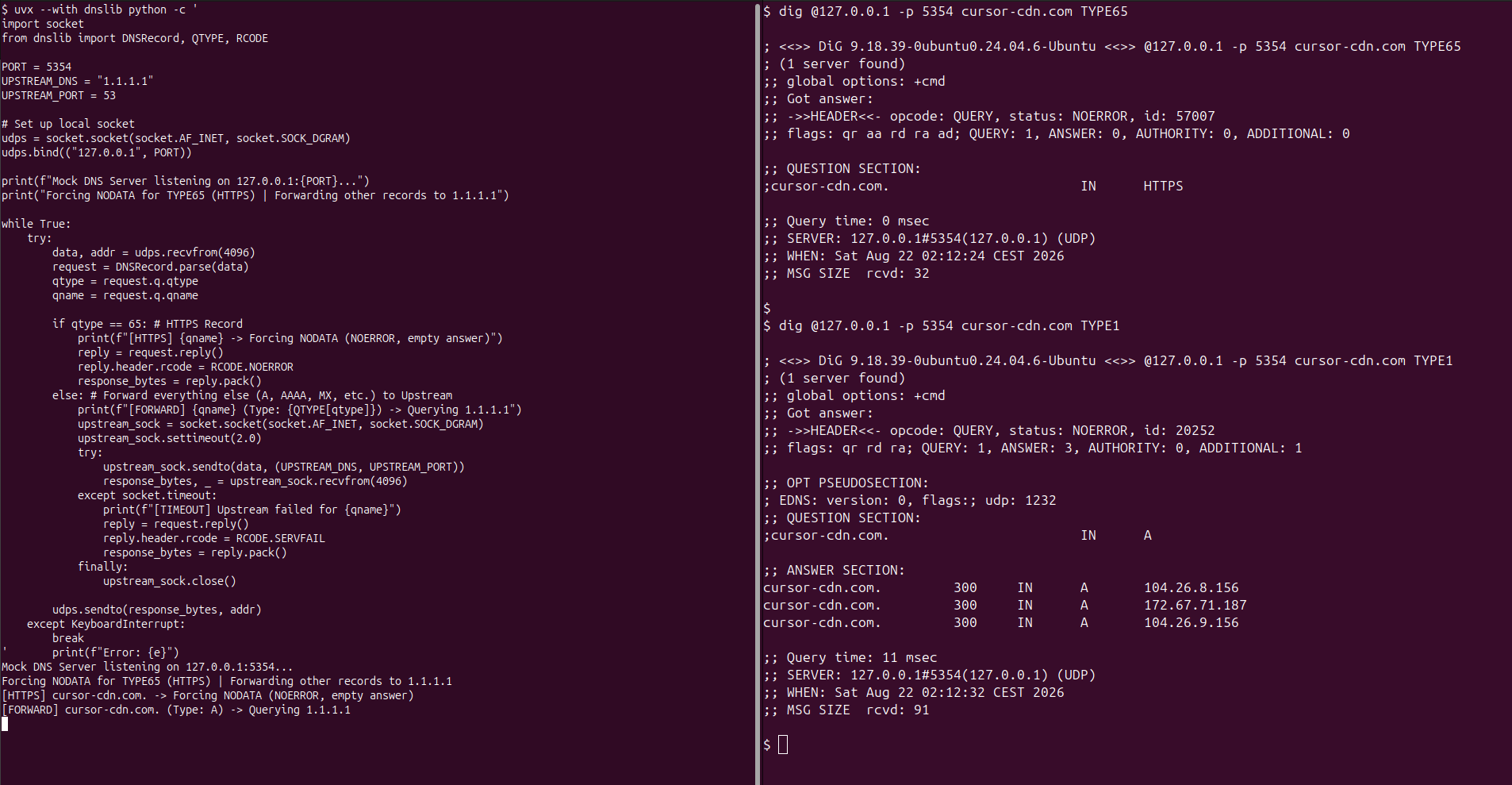
Now you can have the user quit Cursor, wait for a little while (apparently it has some internal DNS cache that has to expire), then open Cursor and start installing plugins.
Basically, what you have done is selectively suppress the ECH bootstrap record by the DNS server, and let the client gracefully fallback to standard A records and classic TLS without any ECH.
References
- https://blog.cloudflare.com/announcing-encrypted-client-hello/
- https://blog.cloudflare.com/handshake-encryption-endgame-an-ech-update/
- https://developers.cloudflare.com/ssl/edge-certificates/ech/
- https://support.mozilla.org/en-US/kb/understand-encrypted-client-hello
- https://cursor.com/docs/enterprise/network-configuration
- https://firefox-admin-docs.mozilla.org/reference/policies/disableencryptedclienthello/
Privacy-First Subscription
Receive a notification in your inbox whenever I publish a new post. This is a reader-focused subscription loop built for absolute privacy: you stay in control, and I do not see, track, or collect your email address.
Follow via FeedRabbit