Shift Left and Reduce the Extraneous Cognitive Load with Git Pre-Commit Hooks - Automating Book Availability Checks
What are Git Hooks and How do they Work?
A Git hook is a custom script that Git executes automatically at specific points during Git operations. These scripts reside in the .git/hooks/ directory of a repository.
There are two types: client-side and server-side.
Client-side hooks, such as pre-commit and pre-push, trigger on local actions like committing or pushing code. Server-side hooks, like pre-receive and post-receive, run on the remote repository during network operations such as receiving pushes.
Sample hook files end in .sample and must be renamed without the extension and made executable (chmod +x .git/hooks/*) to activate. They can be written in any language (shebang is the key).
More info here: https://git-scm.com/book/en/v2/Customizing-Git-Git-Hooks.
Why use Pre-Commit Hooks?
To enable automated checks before commits, and catch issues early in the development process, e.g.:
- Linting
- Formatting
- Type checking
- Security scans
- Docs generation
- Cost estimation
They would run things I already run manually (ruff this, ruff that, mypy…, docs, trivy, terracost…). But with pre-commit hooks, I don’t have to worry about any of those commands. I just do the work, stage, try to commit and the feedback is given to me immediately. Less extraneous cognitive load for me!
Don’t get me wrong: all the checks and tests that existed in CI will continue to exist.
Pre-commit
But .git/ is not part of the versioned content! So do I have to create .git/hooks/pre-commit every time I clone a repo? How can I make sure that all contributors will use the same content?
Enter the pre-commit framework:
- https://github.com/pre-commit/pre-commit
- https://pre-commit.com/
- https://pypi.org/project/pre-commit/
It enables:
- sharing a config via the
.pre-commit-config.yamlcreated in the repo root. - multi-language support. There are hooks for all sorts of things. See https://pre-commit.com/hooks.html.
How to use pre-commit:
- install pre-commit
- run
pre-commit install. This is the part that creates the.git/hooks/pre-commit.
Here’s my PR introducing pre-commit: https://github.com/k-candidate/selenium-book-search-slack-alerts/pull/25.
How the workflow looks like now
# clone repo
# cd repo
uv venv
source .venv/bin/activate
uv sync --locked --all-extras
pre-commit install
# do the work
# git add .
# git commit -m "something" # This will run the checks automatically
If for whatever reason you need to bypass the pre-commit hooks, you do not even need to delete them. Just use: git commit --no-verify.
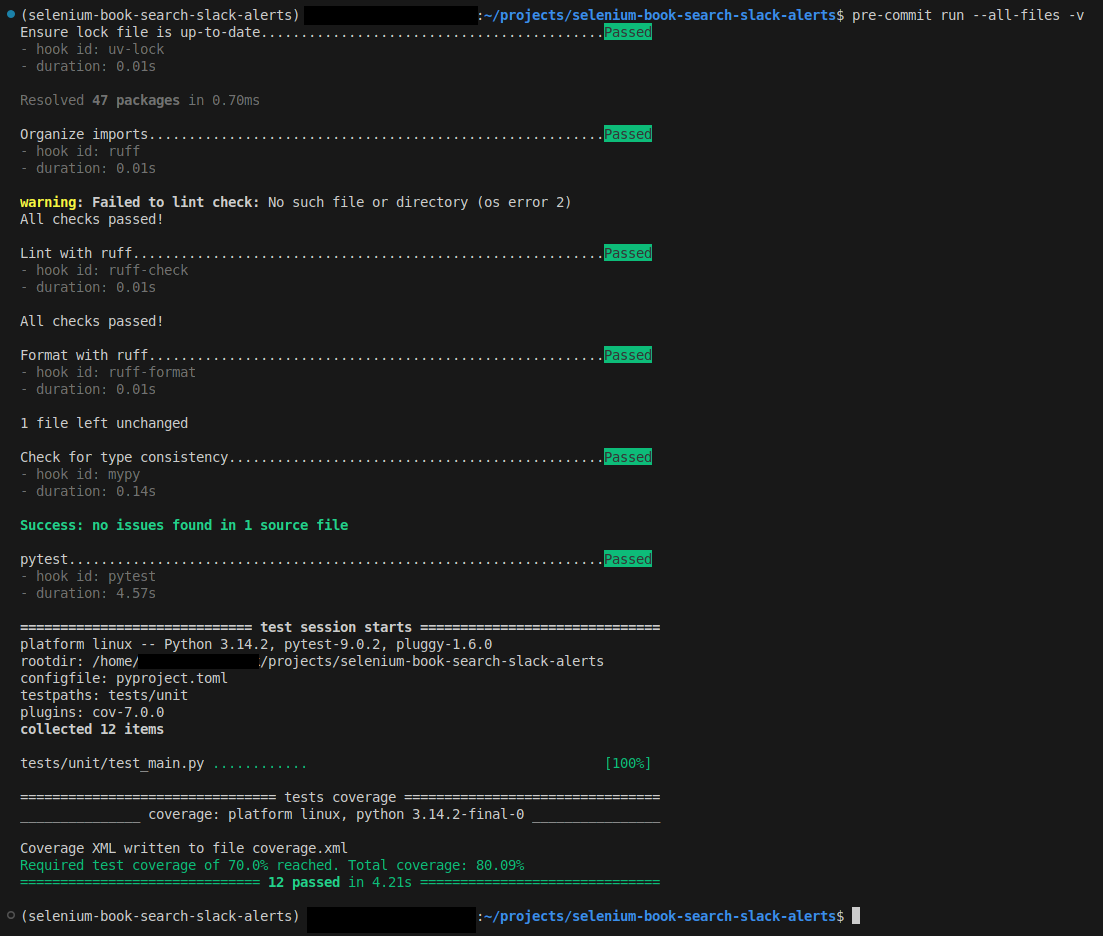
If you want to run the pre-commit checks on all files ad-hoc (before committing): pre-commit run --all-files -v.
What’s with the mypy hook in the PR?
It does not pick up the mypy settings from pyproject.toml. It runs in an isolated environment.
See https://github.com/astral-sh/ty/issues/269#issuecomment-2938669379, and https://github.com/python/mypy/issues/13916.
ty (which I had mentioned in this post) is now in Beta. Anyway, maybe in a few months I might get rid of mypy and use tyinstead. See https://astral.sh/blog/ty.
What about pytest?
What I had mentioned for mypy (that pre-commit can’t use the existing project env, and instead makes its own) applies here as well.
See https://github.com/pre-commit/pre-commit-hooks/issues/291 and https://github.com/pre-commit/pre-commit/issues/761#issuecomment-394167542.
Result
Here’s how the whole thing looks like:
Keep the hooks up-to-date with renovate bot
It’s included in my PR.
https://docs.renovatebot.com/modules/manager/pre-commit/
Important note: The pre-commit manager is disabled by default and must be opted into through config. Renovate’s approach to version updating is not fully aligned with pre-commit autoupdate and this has caused frustration for pre-commit’s creator/maintainer. Attempts to work with the pre-commit project to fix these gaps have been rejected, so we have chosen to disable the manager by default indefinitely. Please do not contact the pre-commit project/maintainer about any Renovate-related topic. To view a list of open issues related to the pre-commit manager in Renovate, see the filtered list using the manager:pre-commit label.
And then there’s https://github.com/renovatebot/renovate/issues/11166 and https://github.com/shellcheck-py/shellcheck-py/issues/32
I wanted to see which one was created first.
The first commit for pre-commit dates back to March 2014.
renovate was created in 2017.
Despite their friction I’ll use it anyway. If it causes issues later I’ll look into replacing it.